
Android Phones
Phone Charging Port Cleaning
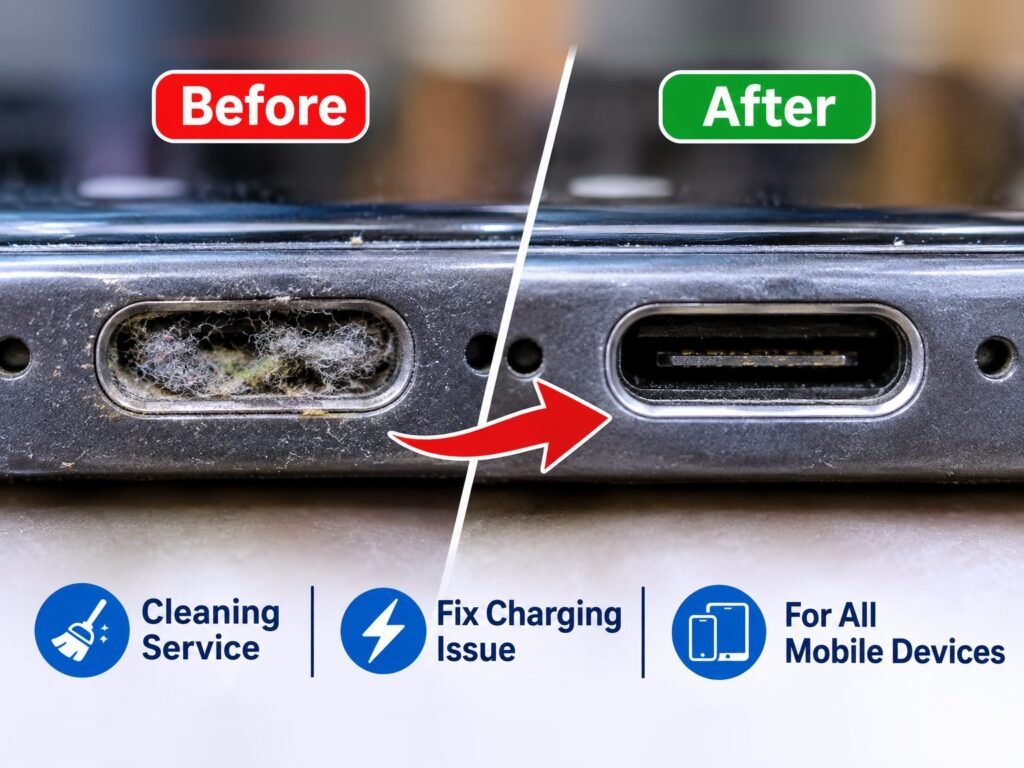
Your phone only charges at a certain angle, the cable feels loose or won't click in, or charging stops when you move it. On iPhone, Samsung and other Android phones, the most common reason is pocket lint and dust packed into the bottom of the charging port. A professional cleaning removes it safely for $20, usually in about 20 minutes, and in many cases saves you from a charging port replacement.
- Common issue we see often
Repair at Vision Mobile
- We repair this in store
- 3341 Markham Road, Unit 119, Scarborough
Signs & causes
How to recognise it, and why it happens
Common symptoms
- Phone charges only when the cable is held at an angle
- Cable feels loose, wobbly or does not click in fully
- Charging starts and stops when the phone moves
- Charges slowly or fast charging no longer works
- "Moisture detected" or water-drop warning on a dry Samsung phone
- Wired headphones or accessories connect on and off
Possible causes
- Pocket lint and fabric fibres packed at the back of the port
- Dust, sand or small debris
- Residue from moisture, sweat or spilled drinks
- Corrosion on the contacts
- Worn or damaged charging cable (rule this out first)
- Bent pins or a worn charging port (needs a port replacement, not a cleaning)
When it usually happens: Usually builds up slowly over months of carrying the phone in a pocket or bag. Common after working in dusty places, after a trip to the beach, or when the phone lives in a jeans pocket.
Before you bring it in
What you can try first
Try this first
Try a different cable and charger, and shine a flashlight into the port to see if lint is visible. Restart the phone. On Samsung, if you see "Moisture detected" and the phone is dry, leave it to air-dry and restart it.
- The port has small, delicate pins. Metal tools such as pins, needles or paper clips can bend them or short the contacts, turning a quick cleaning into a port replacement.
- Cleaning only fixes lint, dirt and residue. If the port is physically worn or damaged, it will need a repair.
- We will also clean the external speaker grille to remove accumulated dust and debris. This may improve your speaker volume and sound clarity, as well as microphone performance.
Safe to keep using it?
Yes, usually safe to keep using. Yes. A dirty port is not dangerous on its own, but stop charging if the cable or port gets hot, smells burnt, or you see corrosion, and bring it in for a check.
Please avoid
- Metal objects such as pins, needles, paper clips or earrings
- Blowing into the port with your mouth (moisture)
- Forcing the cable in
- Liquids or sprays inside the port
- Charging while the port is wet
- Compressed air sprayed upside down or very close (it can push liquid propellant into the port)
Bring it in if:
- The cable still feels loose after a gentle clean
- You can see packed lint you cannot remove safely
- The phone does not charge with any cable
- The port or cable gets hot
- There is green or white corrosion
- The phone was in water or had a spill
In our store
How we diagnose it
- 1Inspect the port under magnification and bright light
- 2Test with a known-good cable and charger
- 3Check the connector seats fully and clicks in
- 4Check the charging current before and after cleaning
- 5Look for corrosion, bent pins or a loose port
The fix
Repair options & prices
Recommended repair
A professional charging port cleaning for $20, usually done in about 20 minutes while you wait: we remove packed lint and debris with non-conductive tools under magnification, clean the contacts, then test charging. If the port is worn, bent or corroded, we explain the charging port repair option and price before doing anything else.
- Professional port cleaning ($20, about 20 minutes) with non-conductive tools under magnification
- Contact cleaning
- Corrosion treatment
- Charging port replacement if needed
- Walk in, no appointment needed
- Tested before you leave
- Any other repair is quoted first
Show the technical details
Every time a cable is plugged in, it pushes any lint inside the port a little further back. Over time this forms a tightly packed layer at the bottom of the port. The connector can no longer go in all the way, so its contacts only touch the phone's contacts partly or not at all. That causes loose, angle-dependent or intermittent charging, and can stop fast charging, which needs a solid connection.
On Samsung Galaxy phones with water resistance, the port also has a moisture sensor. Damp lint or residue can trigger the "Moisture detected" warning even when the phone has not been near water, and the phone will refuse to charge by cable until the port is clean and dry.
Parts that can be involved
- Charging port (Lightning or USB-C)
- Port contacts and pins
- Moisture sensor (Samsung Galaxy)
- Charging flex cable
Other repair options
- Charging port replacement if the port is damaged or worn
- Contact cleaning and corrosion treatment after liquid exposure
- Wireless charging as a temporary workaround (on phones that support it)
How we test after the repair
- Cable seats fully and clicks in
- Charging is steady when the phone is moved
- Fast charging works again (where supported)
- No moisture warning on Samsung phones
- Data connection to a computer works
Vision Mobile, Scarborough
How we can help
- Can we repair it?Yes
- Board-level repairNot offered for this issue
- AvailabilityAvailable in store
- Diagnosis firstWe check your device and explain the problem and price before any repair.
FAQ
Questions, answered
Can I clean my phone's charging port myself?
You can try a gentle clean: switch the phone off, shine a light into the port, and use a short burst of air held upright and not too close. Avoid metal objects, liquids and anything that could leave fibres behind. If lint is packed in tightly, a professional cleaning is safer for the pins.
How do I know if my port needs cleaning or a repair?
If the cable feels loose or only works at an angle, lint is the most common cause and cleaning usually fixes it. If the port is still loose after cleaning, the pins are bent, there is corrosion, or no cable works at all, the port usually needs a repair. We check this before recommending anything.
Why does my Samsung say "Moisture detected" when it is dry?
Damp lint, residue or high humidity in the port can trigger the moisture sensor. Let the phone air-dry and restart it. If the warning keeps coming back on a dry phone, a port cleaning often clears it.
How much does a charging port cleaning cost and how long does it take?
A professional charging port cleaning is $20 and usually takes about 20 minutes, so you can wait in store. We test charging before you leave. If we find the port is damaged and needs a repair instead, we tell you the price first.
Having this problem with your device?
Bring your device to Vision Mobile for professional diagnosis and repair.
Serving Scarborough, Markham, North York and Toronto since 2005.