
All Samsung phones
All Samsung phones
Samsung Charging Port Moisture Warning
Your Galaxy shows "Moisture has been detected" and will not charge with a cable. It is a safety feature: the phone stops charging when it senses liquid in the USB-C port. If the warning stays when the port is dry, there is usually corrosion or a fault in the port.
- Common issue we see often
- Often same day
Repair at Vision Mobile
- We repair this in store
- Often same day
- 3341 Markham Road, Unit 119, Scarborough
Signs & causes
How to recognise it, and why it happens
Common symptoms
- "Moisture has been detected" or water drop icon
- Cable charging blocked, wireless charging still works
- Warning appears even though the phone was not wet
- Warning comes and goes when the cable moves
Possible causes
- Water or sweat in the USB-C port
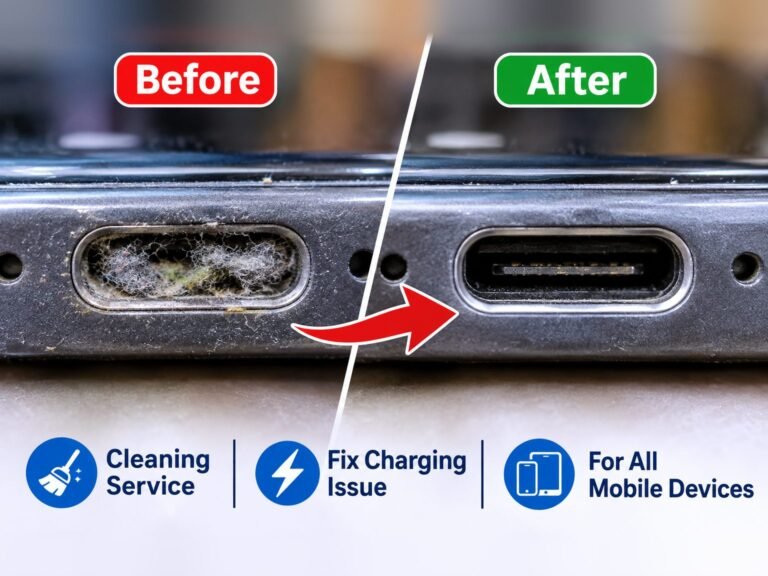
- Lint holding moisture in the port
- Corrosion on the port pins
- Damaged charging board
- Software glitch (rare)
When it usually happens: After rain, a shower or a spill, in humid weather, or long after liquid exposure when corrosion builds up in the port.
Before you bring it in
What you can try first
Try this first
Unplug the cable, power off the phone and let the port dry at room temperature for a few hours, port facing down. Do not use heat. Restarting after it is dry can clear a stuck warning. Wireless charging still works on models that support it.
Safe to keep using it?
Use with care. Do not charge with a cable while the warning shows: liquid plus power can cause corrosion.
Please avoid
- Hair dryers, ovens or rice to dry the port
- Cotton swabs that leave fibres in the port
- Overriding the warning with a cable
Bring it in: When the warning stays after the port has dried, or you see green or white residue in the port.
In our store
How we diagnose it
- 1Inspect the port under a microscope for liquid, lint and corrosion
- 2Test with a known-good cable
- 3Check the warning with the port completely dry
- 4Test wireless charging
- 5Replace the charging board if the fault stays
The fix
Repair options & prices
Recommended repair
If the port is clean and dry and the warning stays, a charging port (charging board) replacement fixes it.
- Port drying and professional cleaning
- Charging board replacement
Show the technical details
The phone measures the resistance between the pins in the USB-C port. Liquid, damp lint or corrosion changes that reading, so the phone blocks charging to protect itself.
If the port is dry and clean and the warning stays, the port is usually corroded or damaged and the charging board needs replacing.
Parts that can be involved
- USB-C charging board
- Charging port pins
Other repair options
- Professional port cleaning when lint or light corrosion is the cause
- Wireless charging in the meantime (where supported)
How we test after the repair
- Cable charging without warning
- Fast charging test
- Data connection test
Vision Mobile, Scarborough
How we can help
- Can we repair it?Yes
- Board-level repairAvailable after assessment
- AvailabilityAvailable in store
- Diagnosis firstWe check your Samsung device and explain the problem and price before any repair.
FAQ
Questions, answered
My phone wasn't wet. Why does it say moisture detected?
Damp lint, humidity or corrosion in the port can trigger it. If it keeps happening, the port needs cleaning or replacing.
Can I still charge my phone?
Yes, with a wireless charger if your model supports it, until the port is fixed.
Keep reading
Related device problems
Having this problem with your device?
Bring your device to Vision Mobile for professional diagnosis and repair.
Serving Scarborough, Markham, North York and Toronto since 2005.